低代码表单设计器设计思路(一)
最近我写了一个低代码表单设计器,已经有一段时间了,现在想总结一下这个过程。
需求原型
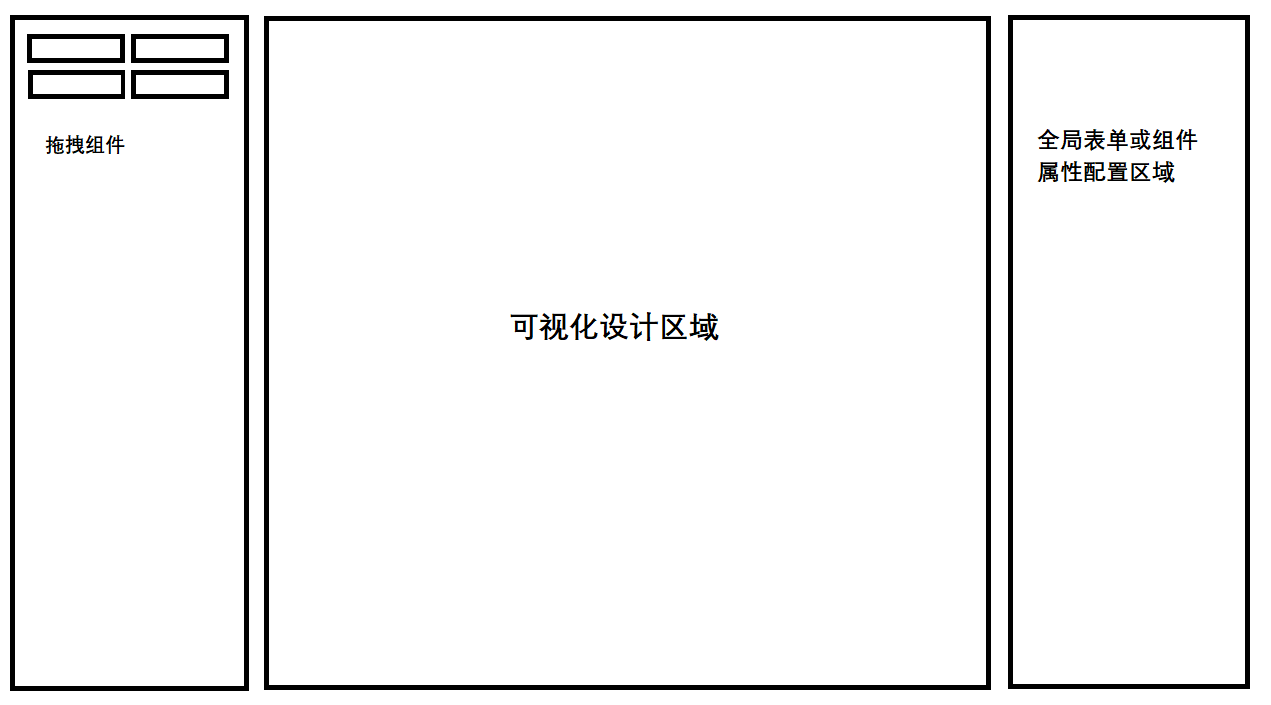
接下来将按照原型草稿逐步实现并填充细节上去
拖拽功能
拖拽有一个现成的库让我们可以快速实现功能:Sortable.js
这还有一个基于它写的vue版本:vuedraggable
使用vuedraggable大大方便我们开发实现由左侧面板组件栏拖拽到可视化编辑区域的功能
vuedraggable的基础用法可以查看 Github,这里就不过多赘述了。
从一个可拖拽列表拖拽到另一个可拖拽列表这种没什么大问题,参照官方给出的示例就可以轻松实现,主要是要计算拖拽后组件的位置,拖拽后的组件需要记录它自身在哪个位置、哪个容器组件下,这事关乎一些功能的实现,比如复制组件的功能。
当一个字段组件在某个父容器组件内,而这个父容器组件可能也在某个容器组件内,在点击字段组件的复制按钮时,如果不知道字段组件所处的位置信息,那么复制后的组件就只能在最顶层显示出来,如图:
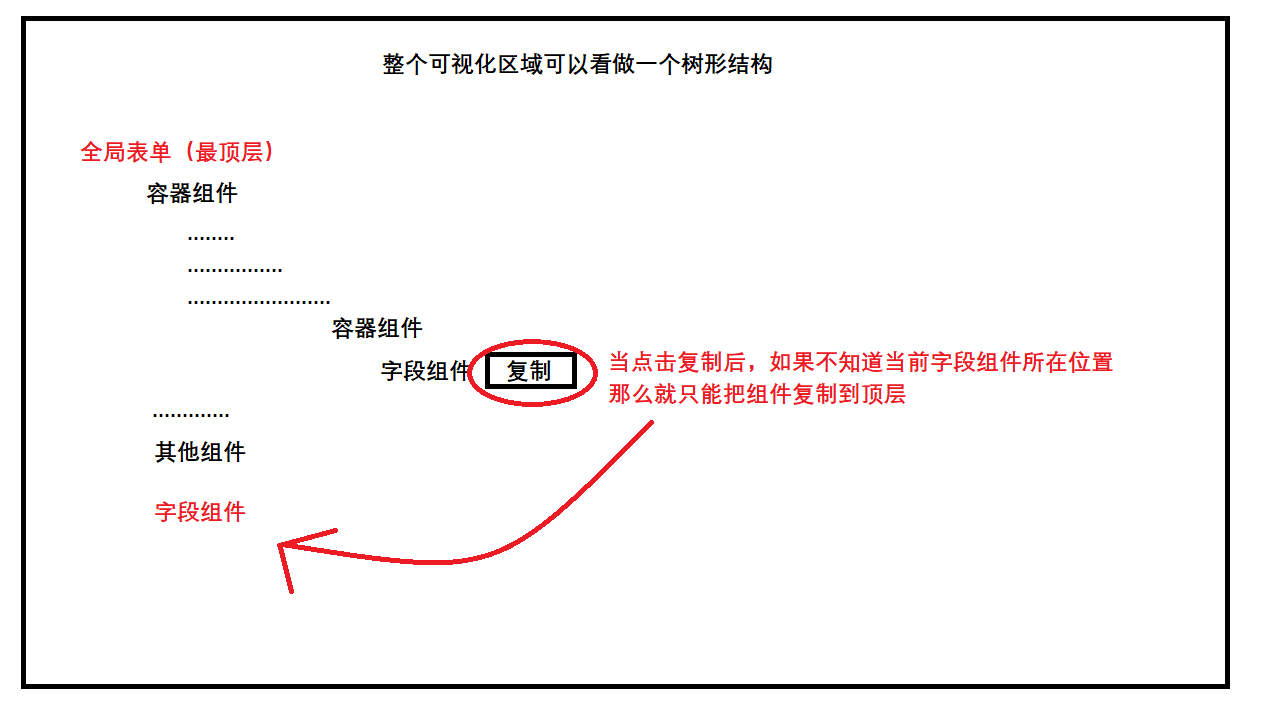
其实用复制功能来举例子并不恰当,因为我们可以规定点击复制就复制到顶层,用户复制完毕后自己再拖拽到原来的容器位置也是可以的。
那么就用组件的上移、下移以及删除功能来说:
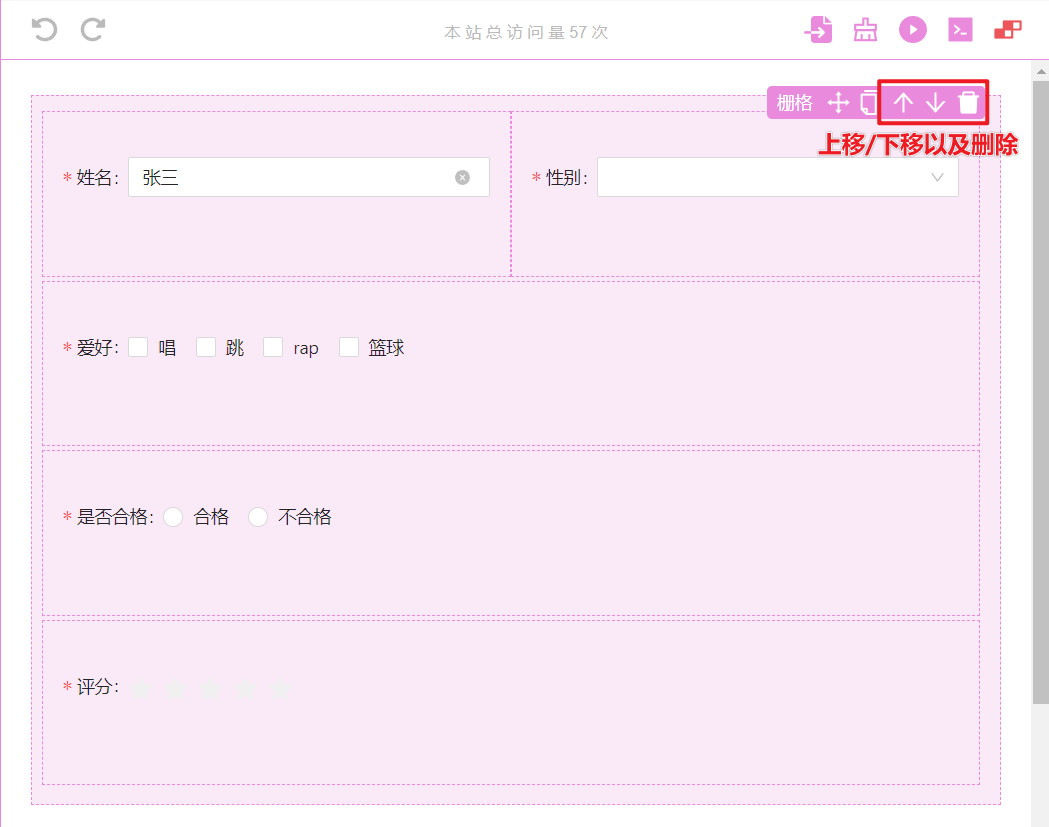
当点击删除时,如果不能清除组件所在的位置信息,那么我们需要在多层级的对象结构中递归循环找到这个组件JSON对象的数据,在可能有数据量大多层嵌套的情况下,这种查找操作是很消耗性能的。
同样在上移、下移时,上移的上方组件我们要拿到和当前的组件进行对换,这也是一种递归查找。
如何解决这种性能问题?
既然需要知道位置信息,那么在渲染对象结构数据时带下去就可以了。
<template>
  <draggable
    v-bind="$attrs"
    :list="widget.childrenList"
    :handle="handle"
    :move="checkMove"
    :clone="clone"
    :group="group"
    :ghostClass="ghostClass"
    :animation="animation"
    :component-data="{
      name: widget.nameAlias || widget.name
    }"
    :item-key="itemKey"
    :disabled="isViewStatus"
    @end="onEndMove"
  >
    <template #item="scope">
      <div :id="scope.element.id">
        <!-- 在这里我们就将父组件位置信息列表的和当前组件的索引组合传递下去 -->
        <!-- 比如这样 [0,0,2,3,1] -->
        <slot
          v-bind="{
            element: {
              ...scope.element,
              path: [...widget.path, scope.index]
            },
            index: scope.index
          }"
        ></slot>
      </div>
    </template>
  </draggable>
</template>
最终整个 渲染数据结构 是这样的:
{
  id: '2ee7bfed-f7df-45b2-9664-a5fc6acfc15e',
  name: "a-form",
  childrenList: [
    {
      id: '33213ac6-cb05-4b7c-8e4b-fd47aff23a4d',
      name: 'a-card',
      childrenList: [
        {
          id: 'ec8ba4dc-9b3e-4f9c-bd29-ef5597a3f631',
          name: 'text',
          // 这里是拼接父组件的位置信息和当前组件的位置信息
          path: ['root', 0, 0],
          type: 'field',
          options: { ... }
        },
      ],
      // 这里是拼接父组件的位置信息和当前组件的位置信息
      path: ['root', 0],
      type: 'container',
      options: { ... }
    },
    {
      id: '6798ad26-f453-4207-a745-46a847a3ed62',
      name: 'a-card',
      childrenList: [],
      // 这里是拼接父组件的位置信息和当前组件的位置信息
      path: ['root', 1],
      type: 'container',
      options: { ... }
    }
  ],
  path: ['root'], // 代表最顶层
  type: 'container',
  options: { ... }, // 一些属性配置
}
当我们操作 name 为 text 的组件时,就可以直接通过 path 存储的位置信息直接找到组件信息进行修改操作,而不必递归循环查找。
至于通过path直接找到的方法,可以通过笨方法一个一个if判断这样找,但更方便的方法是使用 lodash.get 函数,它可以在未找到时可以给出自定义的默认值,且某个属性不存在也不会报错。
当然,path 路径不是直接传递给lodash.get使用的,还是要做下处理补全整个路径再使用。
比如text组件的路径是:[‘root’, 0, 0],root 这个路径是不存在的,它仅在业务表示是顶层的意思,另外每个数字索引实际都是指向的是 childrenList 这个字段数组下的位置
import get from 'lodash.get'
import store from 'path/sotre'


const fullPathList = []

// let indexInParentList = ['root', 0, 0]
indexInParentList.forEach(path => {
    if (path === "root") {
    	return;
    } else {
    	fullPathList.push("childrenList", path);
    }
});

// fullPathList = ['childrenList', 0, 'childrenList', 0]

const textField = get(store, fullPathList)
这样,我们就直接取到 text 组件信息而不消耗太多的性能,同时得益于 store 是一个响应式对象,在取到 text 组件后,它同样是一个响应式对象,可以直接修改它的 options 中的属性,通过可视化的面板让用户轻松完成一些业务。
const textField = get(store, fullPathList)
textField.options.text = '文本内容'
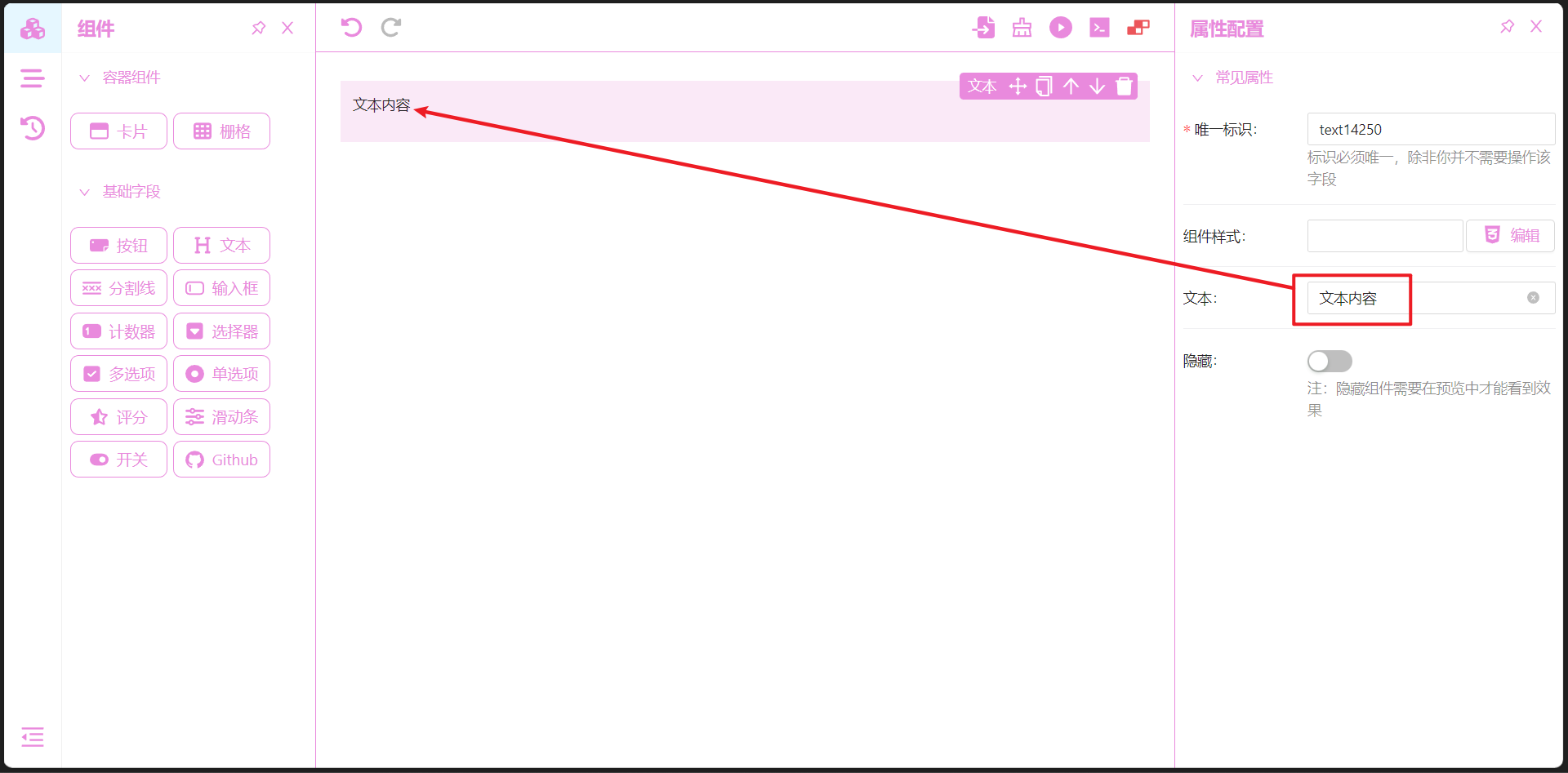
在得知每个组件的位置信息,那么实现上/下移动、复制和删除这些功能就容易多了。
在实现这些功能之前先了解下 text 这些被拖拽组件的代码结构:
<template>
  <static-wrapper :widget="widget">
    <p :class="className">
      {{ widget.options.text }}
    </p>
  </static-wrapper>
</template>
<script setup>
// staticWrapper 组件就是用户在可视化区域可以操作组件的工具栏,比如进行拖拽、上下移动这些
import staticWrapper from '@/designer/components/wrapper/static-wrapper.vue'
import useGlobalSetting from '@/designer/hooks/useGlobalSetting'
defineProps({
  widget: Object
})

// useGlobalSetting hooks 函数,可以先不必理会
const { className } = useGlobalSetting()
</script>
defineProps 定义的 widget 属性就是 text 的渲染结构,属性内就带有 path 路径信息了。
下面开始实现下移功能,在一个容器下有两个 text 同级的组件:
{
    id: 'ec8ba4dc-9b3e-4f9c-bd29-ef5597a3f631',
    name: 'text',
    path: ['root', 0, 0],
    type: 'field',
	options: { text: '文本内容一' }
},
// 与他同级的 text 组件
{
    id: '7a0192fd-e14d-4d95-8e30-31dfe65eccf1',
    name: 'text',
    path: ['root', 0, 1],
    type: 'field',
	options: { text: '文本内容二' }
}
在对第一个 text 组件进行下移操作:
// 寻找父组件
function findParent(indexInParentList) {
  if (isObject(indexInParentList) && hasProp(indexInParentList, "path")) {
    // 防止传递过来了是组件对象
    indexInParentList = indexInParentList.path;
  }

  const isRoot = indexInParentList.length <= 2 && indexInParentList[0] === "root";
  if (isRoot) {
    return store;
  }

  // 寻找的是父级,所以去掉本层级的路径
  const findPath = indexInParentList.slice(0, indexInParentList.length - 1);
  // find 函数就可以参考上面写的 lodash.get 取出操作了
  return find(findPath);
}

function downMove(widget) {
  // path = ['root', 0, 0]
  const { path, nameAlias } = widget;

  // 这里就拿到下移之后的索引位置,0 下移后变成 1
  const currentIndex = path[path.length - 1];
  const nextIndex = currentIndex + 1;

  // 找到它的父组件,取它的 childrenList 列表长度来决定是否可以下移组件
  const parent = findParent(path);
  if (nextIndex > parent.childrenList.length) {
    return;
  }

  // 下移
  parent.childrenList.splice(currentIndex, 1); // 从当前数组中删除
  parent.childrenList.splice(nextIndex, 0, widget);

  // 历史记录,让设计器可以进行撤销还原等。
  recorder.add(`向下移动 ${nameAlias} 组件`, "history-down-icon");
}
上移的操作也基本同理,就是不用比对是否大于父组件的 childrenList 的长度,直接判断上移目标后的索引是否小于等于 0 即可。
function upMove(widget) {
  const { path, nameAlias } = widget;
  const currentIndex = path[path.length - 1];
  const prevIndex = currentIndex - 1;
  if (prevIndex < 0) {
    return;
  }

  const parent = findParent(path);
  parent.childrenList.splice(currentIndex, 1); // 从当前数组中删除
  parent.childrenList.splice(prevIndex, 0, widget); // 删除后再往前面插入

  recorder.add(`向上移动 ${nameAlias} 组件`, "history-up-icon");
}
删除就更简单了,从父组件的 childrenList 数组中删除即可,当然要比对下组件的唯一id,不然删错组件就尴尬了。
function remove(widget) {
  const { path, nameAlias, id } = widget;
  const parent = findParent(path);
  if (parent) {
    const removeIndex = parent.childrenList.findIndex(c => c.id === id);
    parent.childrenList.splice(removeIndex, 1); // 从父组件删除即可
  }
}